

Download WinRAR 7.20 — All Platforms
Official WinRAR installer for Windows, macOS and Linux
WinRAR 7.20 is available for Windows 64-bit, Windows 32-bit, macOS and Linux. All download links on this page point directly to the official win-rar.com servers operated by win.rar GmbH. win-rar-app.com does not host, modify, or repackage any files.
WinRAR offers a 40-day free trial with full functionality. After the trial period, you can purchase a lifetime license from the official shop.
RAR and WinRAR are Windows 11™ and Windows 10™ compatible; available in over 40 languages; and compatible with macOS and Linux. It is the only compression software that fully supports Unicode filenames across all platforms.






WinRAR Download Links — All Versions
| Platform | Architecture | Version | File | Size | Link |
|---|---|---|---|---|---|
| Windows 11 / 10 | 64-bit (x64) | 7.20 | winrar-x64-720.exe | ~3.5 MB | Download |
| Windows 11 / 10 / 8 | 32-bit (x86) | 7.20 | wrar720.exe | ~3.2 MB | Download |
| macOS | Universal | 7.0 | rarosx-7.0.0.tar.gz | ~600 KB | Download |
| Linux | 64-bit | 7.0 | rarlinux-x64-700.tar.gz | ~580 KB | Download |
All files served directly from win-rar.com. win-rar-app.com does not host any files.
What Is WinRAR?
WinRAR is a powerful file archiver and compression utility developed by win.rar GmbH in Germany. First released in 1993, it has grown to become the world's most widely used compression tool with over 500 million users across every continent.
At its core, WinRAR creates compressed archives in the RAR and ZIP formats, reducing file sizes significantly to speed up file transfers and save storage space. Beyond compression, WinRAR provides encryption, multi-volume archive splitting, archive repair, and command-line automation.
Version 7.20 introduces improved RAR5 compression algorithms, better Windows 11 integration, and enhanced Unicode support for international filename handling.
How to Install WinRAR — Step-by-Step Guides
Installing WinRAR on Windows
- Click the "Download for Windows 64-bit" button above to download the installer from win-rar.com.
- Open the downloaded winrar-x64-720.exe file. If Windows asks for administrator permission, click Yes.
- In the WinRAR Setup window, choose your installation folder (default:
C:\Program Files\WinRAR) and click Install. - Select which file types to associate with WinRAR and which shell integration options you want, then click OK.
- Click Done. WinRAR is now installed and integrated into your right-click context menu.
Installing WinRAR on macOS
- Download rarosx-7.0.0.tar.gz from the link above.
- Open Terminal and navigate to your Downloads folder:
cd ~/Downloads - Extract the archive:
tar -xzf rarosx-7.0.0.tar.gz - Move the rar binary to /usr/local/bin:
sudo mv rar /usr/local/bin/ - Verify the installation:
rar --version
Installing WinRAR on Linux
- Download rarlinux-x64-700.tar.gz from the link above.
- Open a terminal and extract:
tar -xzf rarlinux-x64-700.tar.gz - Enter the extracted directory:
cd rar - Run the install script:
sudo make install - Verify installation:
rar --version
Enterprise Silent Installation (Windows)
- Download the WinRAR installer to a shared network location.
- Run the installer with the /S flag for silent mode:
winrar-x64-720.exe /S - Optionally, pre-configure settings using a winrar.ini file in the same directory as the installer.
- Deploy the rarreg.key license file to each machine's WinRAR folder to activate the license.
WinRAR 7.20 — Full Feature Overview
RAR5 & ZIP Compression
Create archives in both RAR5 and ZIP formats. RAR5 offers superior compression ratios compared to ZIP, reducing file sizes by an additional 15–30% on typical data.
14+ Format Support
Open archives in RAR, ZIP, 7Z, CAB, ARJ, LZH, TAR, GZ, ACE, UUE, BZ2, JAR, ISO and Z formats. WinRAR is a single tool that replaces all other archive utilities.
256-bit AES Encryption
Lock archives with industry-standard AES-256 encryption. Optionally encrypt filenames as well as file contents so not even the file list is visible without a password.
Archive Recovery
Add recovery records to RAR archives to protect against data corruption. The built-in repair function can reconstruct partially damaged archives.
Multi-Volume Archives
Split large archives into multiple volumes of a specified size for easy storage or uploading to cloud storage services.
Command Line Interface
Fully featured CLI allows scripted, automated archiving operations. Integrate WinRAR into batch files, PowerShell scripts, or cron jobs on Linux.
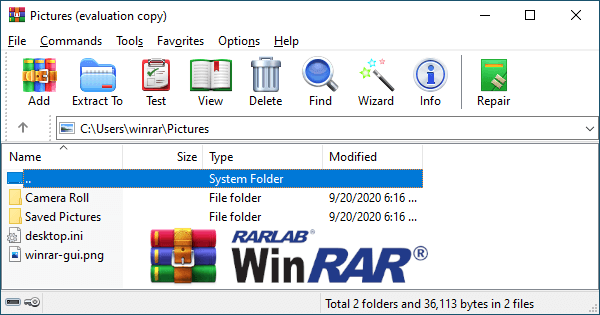
WinRAR Screenshots

Frequently Asked Questions — WinRAR Download
Download WinRAR 7.20 Now
Free 40-day trial. Direct link to the official installer. No bundled software.
⬇ Download WinRAR Free

 📷
in
📷
in